Your AI builds the
entire stream setup
OBS MCP Pro is an MCP server with 58 tools that connects AI assistants like Claude and Cursor to OBS Studio over obs-websocket v5. Say "set up a game stream, purple theme" and it generates the scenes, bundled overlays, mic filter chain, and platform output settings — then diagnoses dropped frames and automates scene switching with an event rule engine. $15 one-time, single edition with all features.
$15 one-time purchase · Single edition, all featuresGenerated by One Prompt
Starting, live, BRB, and ending scenes — scene collection, overlays, and audio filters built by setup_generate.
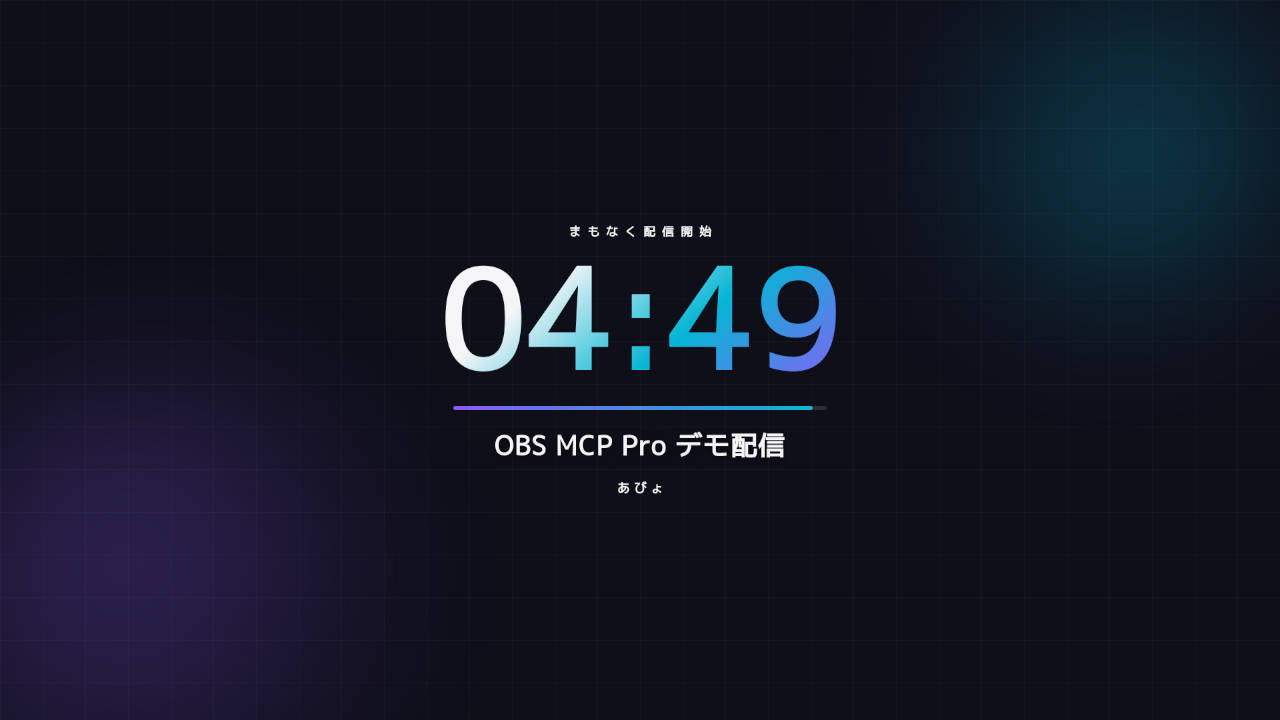
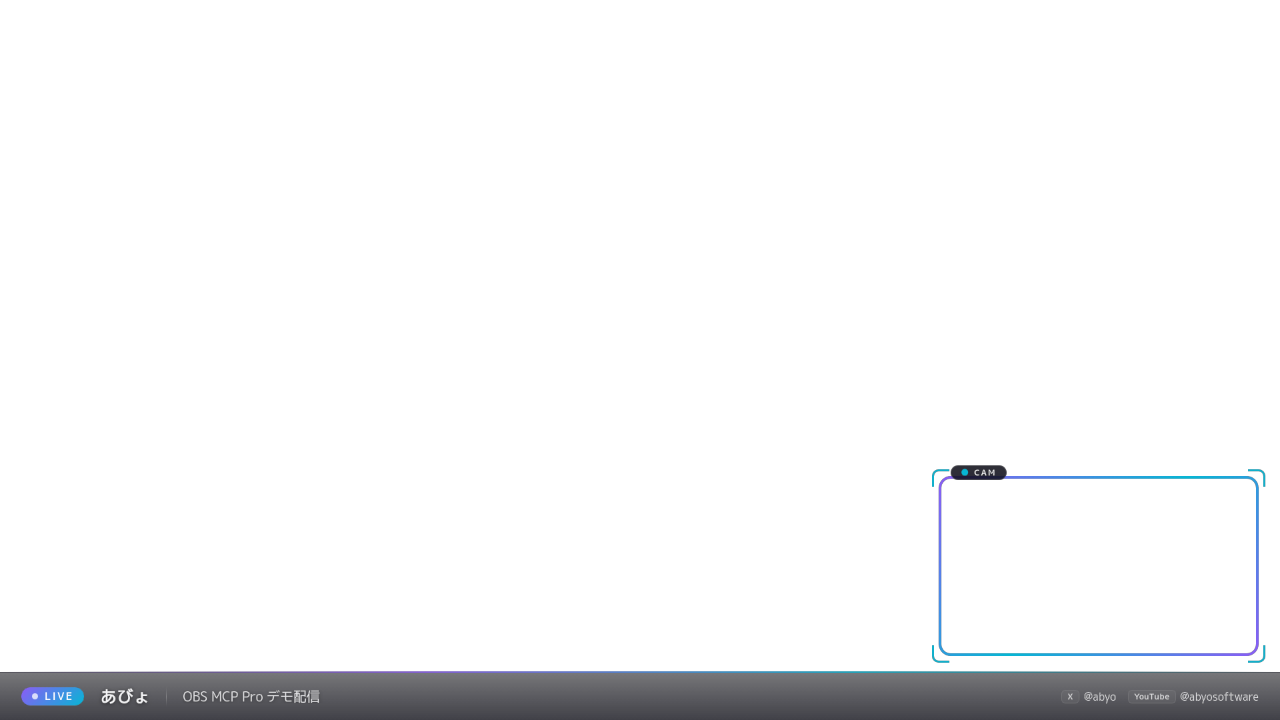
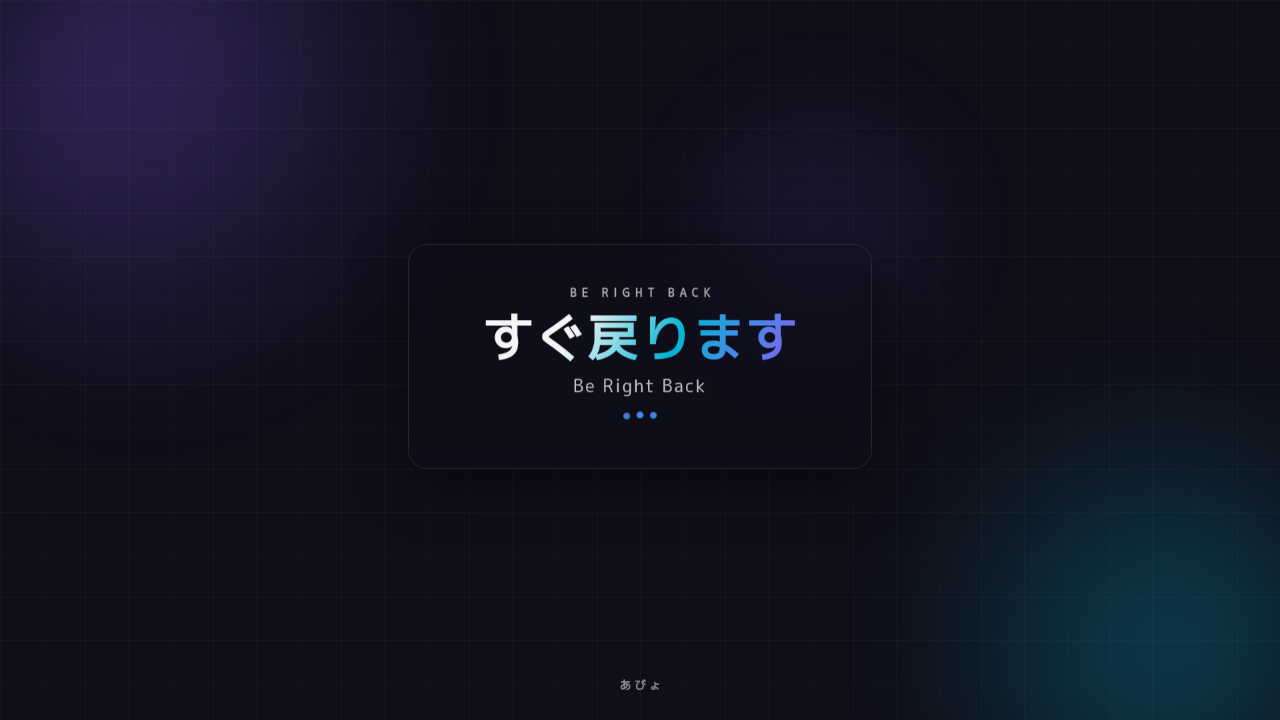
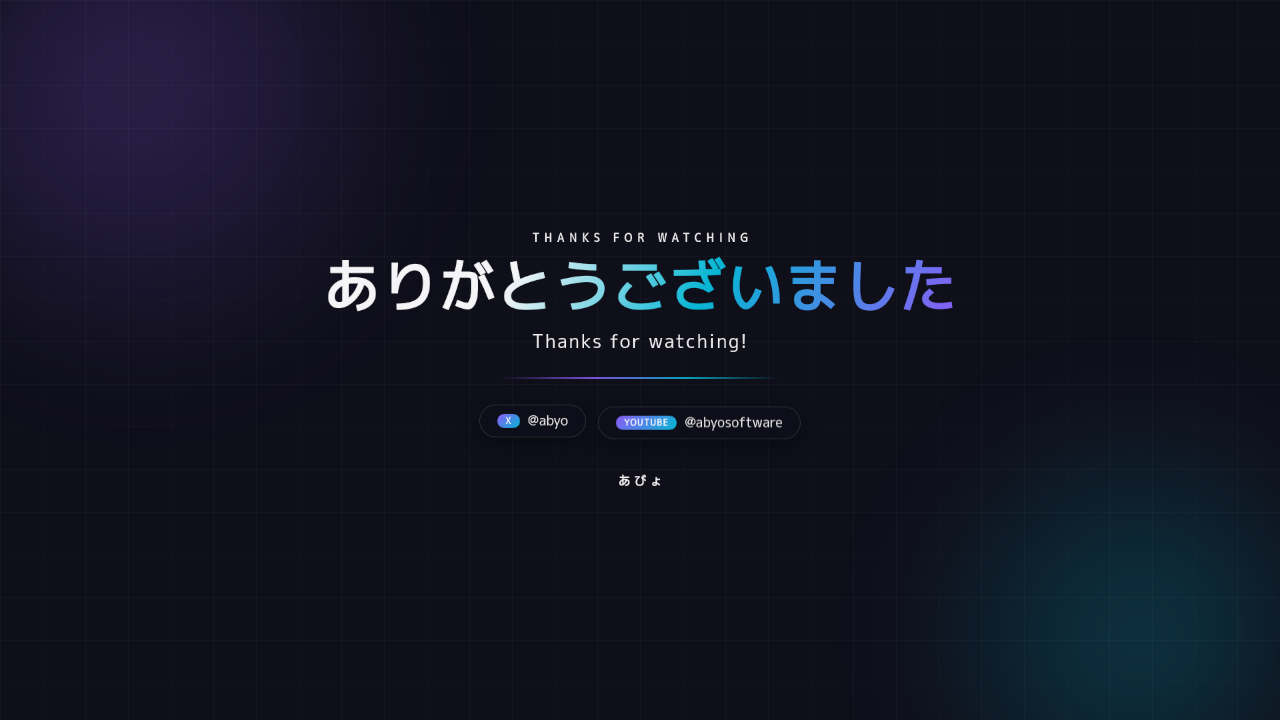
These are unedited screenshots of real OBS output produced by setup_generate — not mockups. A snapshot is taken automatically before generation, so setup_restore rolls everything back in one command.
AI Assistant <--stdio/MCP--> obs-mcp-pro <--obs-websocket v5--> OBS Studio
Talks to OBS Studio through the official obs-websocket v5 protocol (bundled with OBS). Overlays are served to Browser Sources from a local HTTP server — no cloud, no SaaS.
How It Works
Connect your AI assistant to OBS Studio in under 5 minutes.
Enable the WebSocket Server
In OBS Studio: Tools > WebSocket Server Settings > enable and copy the password. obs-websocket v5 ships with OBS — nothing to install inside OBS.
Add the MCP Server
Unzip the itch.io download and add obs-mcp-pro to your AI client's MCP config with the WebSocket password. Works with Claude Desktop, Claude Code, Cursor, and any MCP client.
Ask for a Stream Setup
"Set up a game stream, purple theme." The AI generates scenes, overlays, mic filters, and output settings — then keeps helping: diagnostics, tuning, and automation rules, all in plain language.
in the rule engine
setup_restore
58 Tools for OBS Studio
Setup generation, diagnostics, and automation — plus the full runtime toolkit for scenes, sources, audio, recording, streaming, and replay buffer.
Setup Generation
setup_generatefull scene collection from a promptsetup_snapshotauto-backup before changessetup_snapshot_listbrowse snapshotssetup_restoreone-command rollbacksetup_connectionguided OBS connection wizard
Diagnostics & Tuning
diagnose_streamdropped-frame root-cause analysistune_applyTwitch / YouTube / Niconico profiles (dry-run by default)bench_encodercompare encoder load
Automation Rules
rule_createnatural language → rule JSONrule_listrule_deleterule_enablerule_testdry-run before going live- 6 triggers × 7 actions,
--daemonmode
Overlays
overlay_list10 bundled HTML templatesoverlay_urlserve to Browser Source locally- Frames, chat box, SNS ticker, clock, logo, BRB, starting, ending, lower third
Chapters (Resolve Bridge)
record_with_chaptersscene switches → chapterschapter_markmanual chapter marksrecord_stop_with_chaptersfinalize JSONchapters_statuscurrent session state
Scenes
scene_listscene_switchscene_createscene_remove
Sources & Scene Items
source_listsource_createsource_removesource_settings_getsource_settings_setsceneitem_listsceneitem_set_enabledsceneitem_transformmove / resize / crop
Filters
filter_listfilter_addfilter_removefilter_set_enabledfilter_set_settings
Audio
audio_statusvolume, mute, monitoringaudio_setvolume / mute / filter presets
Recording & Streaming
record_startrecord_stoprecord_statusrecord_pauserecord_resumestream_startstream_stopstream_statusvirtualcam_startvirtualcam_stop
Replay Buffer
replay_startreplay_stopreplay_saveclip the momentreplay_status
Transitions, Media & Advanced
transition_listtransition_setstats_getCPU, memory, dropped frames, render lagmedia_controlplay / pause BGM & videosobs_call_rawany obs-websocket request
Visual Check
screenshot_sourceAI sees your layout and verifies it visually
Why Pro?
Free OBS MCP servers are thin obs-websocket wrappers. These layers are what they don't have.
Setup Generation
"Game stream, purple theme" → complete scene collection (live / starting / BRB / ending), 10 bundled HTML overlays wired into Browser Sources, a mic filter chain (noise suppression → compressor → limiter), and platform output defaults. OBS's hardest first hour, done in one prompt.
Snapshot Safety Net
Every mutating tool takes an automatic snapshot of your current setup before touching anything. setup_restore rolls back in one command. Destructive tools carry MCP destructive hints so your client asks before acting.
Dropped-Frame Diagnostics
diagnose_stream reads live stats and settings, then separates the cause: network, encoder overload, render lag, system load, or plain misconfiguration — with concrete fixes, not a wall of numbers.
Platform Tuning Profiles
tune_apply proposes output settings for Twitch, YouTube, or Niconico — dry-run by default, snapshot before applying. bench_encoder compares encoder load with short recording tests.
Event Rule Engine
6 triggers (scene change, stream/record state, mute, n seconds of mic silence, time of day) × 8 actions (switch scene, record, save replay, mute, toggle filter, play media, webhook…). Described in plain language, stored as JSON, dry-runnable with rule_test.
Daemon Mode
Rules keep running with --daemon even after your AI client disconnects. Fail-safe by design: if the OBS connection drops, rules do nothing rather than misfire mid-stream.
10 Bundled Overlays
Game frame, talk frame, chat box, SNS ticker, clock, logo badge, BRB, starting countdown, ending, lower third. Single-file HTML, served locally, themed via CSS variables — zero external requests.
Chapters for Editing
record_with_chapters turns scene switches and manual marks into a timecoded abyo-chapters.json that DaVinci Resolve MCP Pro reads — record and edit in one AI-driven stack.
AI Sees Your Layout
screenshot_source returns images of any scene or source to the AI, so "does the webcam overlap the chat box?" gets answered by actually looking — and fixed in the same conversation.
What Can AI Do in Your OBS?
Real prompts, handled end to end.
Build a Stream Setup from Zero
AI generates the scene collection, wires the bundled overlays into Browser Sources, applies the mic filter chain, and sets platform output defaults — with an automatic snapshot first, so one command undoes it all.
Find Out Why the Stream Stutters
AI collects live statistics and settings, then pinpoints the cause — network, encoder, render lag, system load, or misconfiguration — and proposes the specific fix.
Auto-Switch When You Step Away
AI writes the rule, dry-runs it with rule_test, and enables it. The rule keeps working in daemon mode even with the AI client closed.
Tune for Your Platform
AI proposes the platform profile (dry-run by default), snapshots your settings, applies on confirmation, and can benchmark encoders to pick the right one for your hardware.
Record with Auto-Chapters
Scene switches and manual marks become a timecoded abyo-chapters.json — readable by DaVinci Resolve MCP Pro for AI-driven editing right after the stream.
Visual Layout Check
AI captures the scene, inspects the image, and adjusts source positions and sizes until the layout is right — no alt-tabbing to check by eye.
Comparison
Runtime control is a solved problem — free OSS does it. Setup generation, diagnostics, and AI-native automation are the product.
| Feature | OBS MCP Pro ($15) | OSS OBS MCP (free) | Streamer.bot | StreamElements |
|---|---|---|---|---|
| AI control via MCP | Yes | Yes | No | No |
| Runtime control (scenes, recording…) | 58 tools | Runtime ops only | Yes | Partial |
| Setup generation | Scenes + overlays + audio + output | No | No | No |
| Bundled overlays | 10 local HTML templates | No | No | Cloud, subscription |
| Dropped-frame diagnostics | Network / encoder / render / system / config | No | No | No |
| Platform tuning profiles | Twitch / YouTube / Niconico | No | No | No |
| Event automation | Natural language, 6×7 rules | No | Powerful, steep learning curve | Partial |
| Auto snapshot & rollback | Before every change | No | No | No |
| Chapter export for editing | abyo-chapters.json | No | No | No |
| Pricing | $15 one-time | Free | Free | Subscription |
Frequently Asked Questions
Common questions about OBS MCP Pro.
What is OBS MCP Pro?
OBS MCP Pro is an MCP (Model Context Protocol) server with 58 tools that lets AI assistants like Claude and Cursor operate OBS Studio over obs-websocket v5. Beyond runtime control, it generates complete stream setups (scenes, overlays, mic filters, output settings), diagnoses dropped frames, applies platform tuning profiles, and automates scene switching with an event rule engine.
What do I need to run it?
OBS Studio 31 or later (the obs-websocket v5 server is bundled with OBS — nothing extra to install in OBS), Windows or macOS, Node.js 20+, and any MCP-compatible AI client such as Claude Desktop, Claude Code, or Cursor.
Does it work on Linux?
Yes — a Linux (x86_64) zip is included. Development and testing happen on Linux, and obs-websocket behaves identically across platforms. For the bundled overlays, use the Flatpak build of OBS (com.obsproject.Studio): most distro packages ship without browser_source.
How is it different from free open-source OBS MCP servers?
Free servers such as royshil/obs-mcp are thin wrappers over obs-websocket: scene switching, record start/stop, and similar runtime operations. OBS MCP Pro covers those too, but the product is the three layers OSS doesn't have — setup generation (scenes + overlays + audio filters + output settings from one prompt), diagnostics & tuning, and an event-driven rule engine — plus automatic snapshots, 10 bundled overlays, and chapter export for editing.
Which AI clients are supported?
Any MCP-compatible client: Claude Desktop, Claude Code, Cursor, VS Code with Cline, Windsurf, and others. MCP is an open standard, so new clients are added regularly.
Can it break my existing OBS setup?
Safety is designed in: every mutating tool takes an automatic snapshot of your current setup first, and setup_restore rolls back in one command. Destructive tools carry the MCP destructive hint so clients ask for confirmation, and tune_apply is dry-run by default.
Do automation rules keep running when I close my AI client?
Yes. Start the server with --daemon and the rule engine keeps running independently of any MCP client. It is fail-safe: if the OBS connection drops, rules do nothing rather than misfire mid-stream.
What is the update policy?
The $15 purchase covers all updates within the current major version (v1.x) — new overlay templates and fixes included. If a future OBS/obs-websocket breaking change requires a new major version, that upgrade would be a separate purchase. No subscription either way.
What about refunds?
Purchases go through itch.io. If the product doesn't work in your environment and we can't get it working together, contact us on Discord or at [email protected] and we'll sort out a refund.
Is there a subscription or license key?
No. $15 one-time, single edition with all features, delivered as a Zip on itch.io. No license keys, no activation, no cloud dependency — overlays are served from a local HTTP server and everything runs on your machine.
Quick Setup Guide
Get up and running in under 5 minutes.
1. Enable the WebSocket Server in OBS
OBS Studio 31+ ships with obs-websocket v5 built in. Enable it and copy the password:
Tools > WebSocket Server Settings > Enable WebSocket server
2. Download & Unzip
Grab the Zip from itch.io and unzip it anywhere. Single edition — everything is included.
3. Configure Your AI Client
Add the server to your AI client's MCP configuration (e.g., .mcp.json for Claude Code) with the WebSocket password:
{
  "mcpServers": {
    "obs": {
      "command": "/path/to/obs-mcp-pro/obs-mcp-pro",
      "env": { "OBS_WS_PASSWORD": "your-password" }
    }
  }
}
4. Ask for Your Setup
Start with setup_connection if you want a guided connection check, then just ask: "Set up a game stream, purple theme." Your AI now has 58 OBS tools.
Simple, One-Time Pricing
Single edition. All features. No subscription.
- ✓ All 58 MCP tools
- ✓ Setup generation + 10 bundled overlays
- ✓ Diagnostics & platform tuning profiles
- ✓ Event rule engine with daemon mode
- ✓ Free updates for all v1.x releases
- ✓ Discord support channel